Hamchapon Adventure
Text-Based Adventure Game (OOP)
About the Project
Hamchapon Adventure is a text-based, gacha-adventure game, where the player faces off against the Champion League of Hamchas. Players start the game with three Hamcha characters that are randomly selected and used for battles. The game is created using C++ and uses keyboard inputs to progress in the game. For clarification, ‘gachapon’ is a type of vending machine that randomly dispenses capsule toys, and the game genre ‘gacha’ uses this mechanic which is similar to receiving randomized loot boxes. Gachapon rolling and battling are the main components of the game.
How to Play
Game Mechanics
Before entering into a battle, the player has the option to prepare by “rolling” to draw certain Hamcha characters or Food items. The player may roll however many times they want. When the player is ready, they may enter into battle mode. The player faces off against the CPU through turn-based battling. Each turn, the player selects one of their drawn Hamchas, which faces off against the CPU’s Hamcha. The Hamcha with the winning Rank or greater Rarity wins, and the numerical value of the Rarity is subtracted from the player or CPU’s health. The concepts of ‘Rarity’ and ‘Rank’ will be further elaborated on in section ‘Rank and rarity’. The game continues until either the Player or CPU loses all health. The player can also choose to use Food to “buff” their Hamcha’s rarity for one turn.
Merging and replacing Hamchas
When rolling for Hamchas, the program will use the ‘yourHams’ and ‘allHams’ array as parameters. It uses ‘allHams’ to receive the possibilities of what Hamchas can be rolled, and ‘yourHams’ to check for duplicates that are already in the player’s collection. When the player rolls a duplicate Hamcha, they have the choice to either replace any one of their Hamchas with the rolled Hamcha, or to merge the two duplicate Hamchas together. When two Hamchas are merged together, the Rarity of the original Hamcha will permanently increase by 1 point.
Rank and rarity
In the game, each Hamcha has two specific designations: its Rank and its Rarity. There are three types of Ranks: King, Queen, and Ace. Similar to Rock-Paper-Scissors. Each rank wins and loses to another specific rank. The system follows as such:
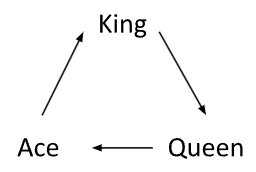
A King rank beats a Queen rank, a Queen beats an Ace, and an Ace rank beats the King rank.
If the two Hamchas played are the same Rank, then the winner shall be determined using its Rarity, an arbitrary value ranging from 1 to 5. The Hamcha with the higher rank will take the win for the round. Rarity will not play a role during a Rank battle. Rarity can be buffed (increased by 1) using a Food item, which will last for only one round. If the Rarity of the two Hamchas are also the same, then both the player and the opponent shall receive equal damage.
Role of Functions and Classes
The gachapon-rolling mechanic uses a function to select a random integer, which correlates to a specific Hamcha ID. When rolling, the randRoll function takes two arrays, ‘yourHams’ and ‘allHams’ as parameters. Battles in Hamchapon Adventure use rock-paper-scissors mechanics with some modifications for added complexity. After a player draws one of their Hamchas to be played, the program randomly selects a Hamcha from their own roster to battle against the player’s Hamcha. The rank of the Hamchas is compared, and if the Rank battle ends in a draw, the program then enters a Rarity battle, where the rarities of the two Hamchas are compared. The Hamcha with the greater rarity wins the round. During the battle, the player will need to make a selection at every turn/round. During a round, the player is provided with the battle menu that displays different selections they may make. They can either attack with the current Hamcha, use one of their Treats (food items), swap the current Hamcha, view all Hamcha available in their roster, or they may choose to surrender the battle. These options are all available in the battleMenu() function using if-statements in a loop. The story functions are split into sections that follow a chronological order. This order can only be followed, however, if certain conditions are met, i.e. if the player makes the correct selections and wins their battles. This is explained more in depth in section ‘Story and Script’.
Design Choices and Revisions
Win condition for battles
In the previous revision of the game, I had each Hamcha character with its own HP. I realized that the game would be in favour of whoever had more Hamchas. For example, the player with a single Hamcha character with 15 HP would be at a great disadvantage against the CPU with three Hamchas with 15 HP. To rectify this issue, I had introduced a new rule that removed the individual HP property of each Hamcha and players then used a new concept called “teamHP”. The player and CPU would now have an overall HP of 15 no matter the number of Hamchas. This new rule helped create fairness within the game and gave a higher chance to the player to progress in the storyline.
Viewing the user’s current roster
The function ‘viewHam’, appeared to work properly during the initial development phase. The function should receive the user’s Hamcha party as a parameter and display a Hamcha’s stats to the screen. These stats are the properties of the object type ‘Hamster’, which include HP, Rank, Rarity, Name, etc. The issue with this function was that it did not display all the Hamchas the user had in their party. The function would only output the stats of the first Hamcha in the party. Since there were not many game variables ‘viewHam’ interacted with, this issue remained undetected for a while. I successfully troubleshooted the problem and re-wrote the conditions of its looping system.
Story Pacing and Scripts
In order to progress the game in a way that kept the story organized and working together cohesively, the main story is split up into sections: the prologue, battles, losses, wins, and endings. Each of these sections were subsequently placed into corresponding functions such as prologue(), battle1(), battle2(), etc… Each function contained that particular section’s written outputs. The Battle functions provide two different endings: a win or a loss. A loss will prompt the player to attempt to retry the battle while a win will progress the game onwards. When the player has achieved the Win scenario in all Battle functions, they can then receive the End Game scenario.
Upon reviewing gameplay mechanics, I found that implementing a pause function would help with gameplay. Before the game would display the whole story after character selection. This made it hard for players to pinpoint which part they were at in the story. Since the implementation of the pause function, the story is now printed in sections and the program prompts players to press a key to continue. This has changed the gameplay for better because storyline text is now broken up to more manageable pieces and has a better pacing.
Code Examples
Classes and members
The Hamster class seen below contains all the characteristics and functions relating to the Hamchas and operations concerning them.

The Player class seen below sets name, gender, and HP levels while also initializing the opponent Player objects which are contained in a list.

Gacha function
The gacha function called “randRoll” below randomly draws a Hamcha from the array allHams[] and also checks for duplicates already in the player’s roster in the array yourHams[].
